Windows 3.1
Microsoft released Windows 3.1 in 1992 as a refinement of Windows 3.0, offering improved memory management, bundled TrueType fonts, and a $149.95 retail price
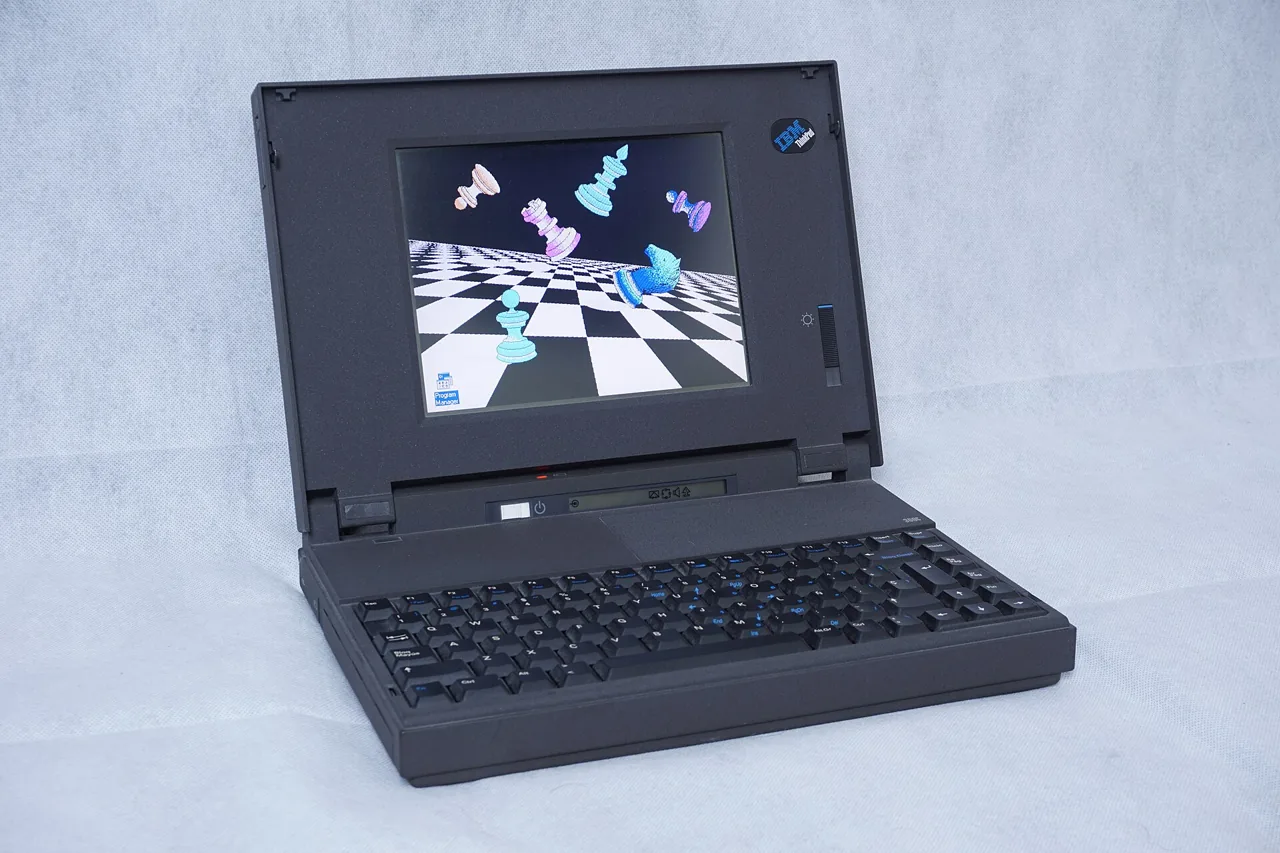
Windows 3.1 was not a reinvention, but a recalibration. Its version number’s 0.1 nudge belied a deliberate, almost surgical set of upgrades over Windows 3.02. Where 3.0 had stumbled into usability, 3.1 smoothed the edges: faster performance, better stability, and broader hardware support. Microsoft positioned it not as a revolution but as a refinement, doing what 3.0 did, only easier and faster15. Approximately 90 percent of its internal architecture remained unchanged from the prior version, a fact that highlighted its role as a maintenance release rather than a leap forward2. Yet within that constraint, it delivered tangible improvements: most notably, the inclusion of TrueType scalable fonts, which for the first time gave PC users WYSIWYG typography without third-party add-ons. A bundled 44-font TrueType package, offered at a special price of $99.99 until June 1, highlighted Microsoft’s push into desktop publishing12.
Its memory model was both a strength and a Rube Goldberg compromise. While Windows 3.0 could access up to 16MB of RAM and 64MB of virtual memory in 386 Enhanced Mode, Windows 3.1 shattered those limits, supporting theoretically 4,048MB (4GB) of addressable memory and virtual memory “many gigabytes” deep, far beyond any contemporary PC’s physical capacity2. This was achieved through refinements in DPMI (DOS Protected Mode Interface) and VCPI (Virtual Control Program Interface), documented in the Windows 3.1 Resource Kit as foundational to multitasking and memory arbitration1. The OS continued to rely on MS-DOS 3.1 or later as a substrate, with version 5.0 or higher recommended, and required at minimum a 286 processor with 640K conventional and 256K extended memory, though 386SX or higher with 2MB of extended RAM was advised for full functionality12. SMARTDrive 4.0 integration improved disk caching, and the WINA20.386 driver enabled expanded memory access on 386 systems, bridging legacy demands with emerging capabilities1.
Market Rollout & Bundling Strategy
Microsoft anticipated demand at a scale that strained supply chains: the company reportedly cornered the global floppy disk market to prepare for an estimated shipment of 1 million copies within the first 30 days15. The base product carried a suggested retail price of $149.95, with upgrades available for $49.99 until June 1, rising to $79.95 thereafter12. To drive hardware adoption, Microsoft offered Windows 3.1 bundled with either the Microsoft Mouse or the BallPoint™ mouse at a special package price of $22512. This bundling signaled a shift toward integrated input solutions, acknowledging the OS’s reliance on graphical interaction.
For developers, Microsoft expanded the tooling ecosystem. The Windows 3.1 SDK, priced at $349, included twice the documentation of prior versions, enhanced utilities, and new support for multimedia and pen computing, foreshadowing features that would mature in later releases12. Over 75,000 SDKs had already been shipped by mid-1992, indicating strong developer engagement12. The Device Driver Kit (DDK), available for $150 as an upgrade ($500 retail), provided nearly 2,000 pages of driver-specific documentation and introduced a universal printer driver framework12. The DDK’s CD-ROM version was priced at $99, a rare early use of optical media for developer distribution12.
Compatibility & Constraints
Despite its refinements, Windows 3.1 remained tethered to DOS and its limitations. Network connectivity required separate client software installation, a gap that left enterprise deployment fragmented13. The OS supported Hercules-compatible and VGA or better video adapters, but the documentation was silent on specific resolutions or color depths12. A compatibility matrix in the Resource Kit listed approved machines, displays, keyboards, pointing devices, networks, and printers: evidence of the era’s hardware fragmentation1.
Notably, the filesystem enhancements that would define Windows 95 were already in development by early 1991, but their full implementation was deferred. Elements of the new architecture first appeared in November 1993 with Windows for Workgroups 3.11, which itself lacked long filenames and other core features of the future 32-bit platform3. This staggered rollout revealed Microsoft’s strategy: extend the 16-bit line while quietly building its successor.
Legacy
Windows 3.1 succeeded not by reinventing the GUI, but by perfecting the imperfect foundation of 3.02. It was stable enough for business adoption, rich enough for early multimedia experiments, and ubiquitous enough to cement the Windows API as a development standard. Over 90 percent of the technical content in contemporary guides applied equally to both 3.0 and 3.1, a reflection of its evolutionary nature2. It did not introduce the future. It bought time for it.
| Manufacturer | Microsoft |
| Product type | Operating system |
| Original price | $149.95 (suggested retail) |
| Upgrade price | $49.99 (until June 1), then $79.95 |
| Special offer | $99.99 for Windows 3.1 Upgrade + 44-font TrueType package (until June 1) |
| Windows/Mouse package | $225 with Microsoft Mouse or BallPoint™ mouse |
| SDK price | $349 (full), $150 (upgrade development kit) |
| DDK price | $500 (retail), $150 (upgrade on disk), $99 (upgrade on CD-ROM) |
| System requirements | MS-DOS 3.1+ (5.0+ recommended); 80286+ CPU (80386SX+ recommended); 640K conventional + 256K extended memory (1MB+ recommended for 286, 2MB+ for 386); pointing device recommended |
| Display requirement | Hercules-compatible or VGA/better video adapter |
| Memory addressing | Theoretical maximum of 4,048MB (4GB) |
| Virtual memory | “Many gigabytes” accessible in 386 Enhanced Mode |
| Hard disk space management | Automatically manages up to three times the amount of physical RAM |
References
- 030-31645 Microsoft Windows 3.1 Resource Kit 1992 (1992)
- Windows 3.1 Secrets - Revised and Expanded
- Inside Windows 95 Adrian King 1994 (1994)
- remark-volume13-issue6-1992 (1992)
- URP 11th edition
- STR815.TXT.generated